
Print From Anywhere7.0.15 - Google Play
You'll be able to see results in few seconds.
Publisher Description
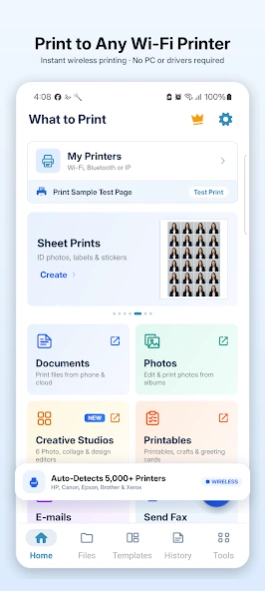
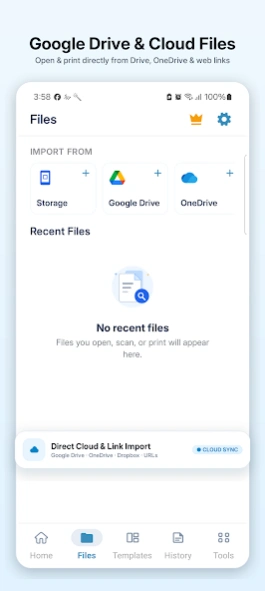
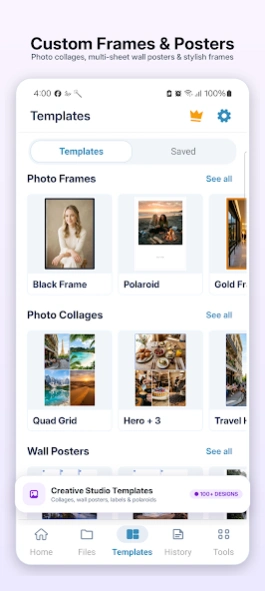
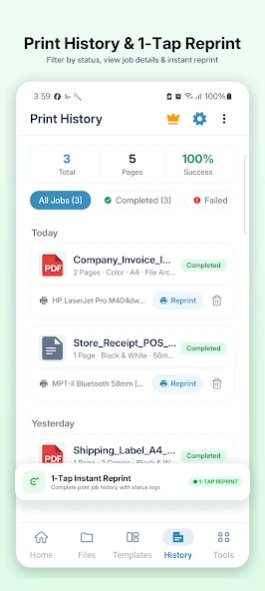
Print documents, photos, PDFs, web pages, and labels wirelessly from your phone.
Print From Anywhere – Smart Wi-Fi & Bluetooth Thermal Printer App
Print documents, photos, PDFs, shipping labels, POS receipts, web pages, and more directly from your Android phone or tablet. Connect seamlessly to Wi-Fi network printers or Bluetooth thermal receipt printers with zero setup hassles—no computer, cables, or complex printer drivers required!
Print From Anywhere automatically detects wireless printers on your Wi-Fi network and easily pairs with portable Bluetooth thermal printers (ESC/POS). You can also connect to any network printer manually using its IP address.
Whether you need to print office reports, school assignments, invoices, shipping labels, restaurant bills, photo calendars, or payment QR codes, Print From Anywhere delivers fast, crisp, and reliable printing in seconds.
═══════════════════════════
🌟 KEY FEATURES & CAPABILITIES
═══════════════════════════
🖨️ WI-FI & NETWORK PRINTING
• Automatic auto-discovery of nearby wireless printers
• Direct Wi-Fi & IP address manual printer setup
• Instant print preview with multi-copy support
• Compatible with thousands of top printer models
🧾 BLUETOOTH THERMAL POS RECEIPT MAKER (NEW!)
• Supports 58mm (2-inch) and 80mm (3-inch) portable Bluetooth printers
• Full ESC/POS standard support for fast, ink-free receipt printing
• Quick POS Bill Generator: Add store name, items, taxes, and instant totals
• Print Barcodes (Code 128) and QR Codes (UPI payments, website URLs)
• Sharp multilingual text printing in regional and global languages
• Hardware commands: Paper Feed, Auto Cut, and Cash Drawer trigger
📄 VERSATILE FILE & CLOUD SUPPORT
• Print PDF documents, Word/Office files, and TXT files
• Print high-resolution photos (JPEG, PNG, WEBP)
• Cloud Import: Browse and import directly from Google Drive, OneDrive, and Dropbox
• Web Import: Download and print documents directly via link/URL
⚙️ CUSTOM PRINT SETTINGS
• Standard paper sizes: A4, Letter, Legal, A5, 4×6", 5×7", and thermal rolls
• Portrait or Landscape orientation
• Color or crisp Black & White printing
• Custom margins, page ranges, and scaling (Fit to Page, Fill, or Center)
🛠️ ALL-IN-ONE PDF TOOLS
• Merge multiple PDF files into one
• Split PDF pages easily
• Compress PDF file size (Balanced, Best Quality, Smallest File Size)
• Add custom text or image watermarks
• Extract and convert PDF pages into images
🏷️ PHOTO & LABEL STUDIO
• Design custom shipping, address, folder, and product labels
• Supports multiple label shapes: Rectangle, Square, Oval, Circle
• Multi-Photo Collage: Print multiple photos per sheet with custom spacing
• Poster Maker: Split large photos across multiple pages for wall posters
• Decorative photo frames, captions, and date stamps
📅 CALENDAR & PRINTABLE TEMPLATES
• Create personalized photo calendars, weekly planners, and schedule sheets
• Educational Printables: Math worksheets, spelling quizzes, and practice sheets
• Productivity Templates: Graph paper, dot grid paper, music sheets, and lined paper
📷 HD DOCUMENT SCANNER (Google ML Kit)
• High-quality camera scanning with automatic edge detection
• Smart perspective correction and document enhancements
• Multi-page batch scanning and digital signature placement
🌐 BUILT-IN WEB BROWSER PRINTING
• Print web pages, news articles, receipts, and online tickets directly from the app
📋 PRINT JOB HISTORY & REPRINT
• Track all completed and failed print jobs with file details
• 1-tap instant reprint for frequently used files and bills
═══════════════════════════
🖨️ BROAD PRINTER COMPATIBILITY
═══════════════════════════
Works with virtually all Wi-Fi, AirPrint, Mopria, and network printers from:
HP, Canon, Epson, Brother, Samsung, Xerox, Pantum, Lexmark, Kyocera, Ricoh, and more.
Works with standard ESC/POS Bluetooth thermal receipt printers from:
Munbyn, Zebra, Rongta, Xprinter, Netum, Epson POS, Sunmi, and generic Bluetooth 58mm/80mm printers.
About Print From Anywhere
The company that develops Print From Anywhere is PrintNova. The latest version released by its developer is 7.0.15.
To install Print From Anywhere on your Android device, just click the green Continue To App button above to start the installation process. The app is listed on our website since 2026-09-20 and was downloaded 0 times. We have already checked if the download link is safe, however for your own protection we recommend that you scan the downloaded app with your antivirus. Your antivirus may detect the Print From Anywhere as malware as malware if the download link to com.nilhin.nilesh.printfromanywhere is broken.
How to install Print From Anywhere on your Android device:
- Click on the Continue To App button on our website. This will redirect you to Google Play.
- Once the Print From Anywhere is shown in the Google Play listing of your Android device, you can start its download and installation. Tap on the Install button located below the search bar and to the right of the app icon.
- A pop-up window with the permissions required by Print From Anywhere will be shown. Click on Accept to continue the process.
- Print From Anywhere will be downloaded onto your device, displaying a progress. Once the download completes, the installation will start and you'll get a notification after the installation is finished.
Program Details
System requirements
Download information
Pricing
Version History
version 7.0.15
posted on 2026-09-20
Updated Privacy Policy and stability improvements.
version 7.0.12
posted on 2026-09-11
• All-in-One PDF Tools: Compress, merge, split, watermark, and convert PDFs easily
• Creative Print Studios: Custom calendars, wall posters, labels, and photo frames
• Mobile Cloud Fax: Send domestic & international faxes with custom cover pages
• USB / OTG & Wireless Printing: Connect and print directly via USB OTG cable, Wi-Fi, or Bluetooth
• High-Definition Export: Custom 150 DPI, 300 DPI & Ultra HD print quality with faster rendering
version 7.0.6
posted on 2026-09-02
What's New in Version 7.0.6:
- Fixed app crashes on Android 10 and older devices when accessing storage permissions.
- Improved subscription plan loading and streamlined paywall selection UI.
- Resolved layout visibility issues on PDF tools result screens.
- General performance and stability enhancements.
version 7.0.4
posted on 2026-08-09
What's New:
- Precise image and document alignment between print preview and final output.
- Fixed PDF file loading issues in PDF tools.
- Updated Premium screen UI design.
- Bug fixes and stability improvements.
version 6.2.0
posted on 2025-11-12
Bug fixes, support for the latest Android features, and more printers added! 🚀 Enjoy an even better printing experience! 🎉
version 6.1.7
posted on 2024-08-20
Great news! The latest update for "Print From Anywhere" is here! 🚀 Now, you can personalize your app with Dark 🌙 and Light ☀️ Themes. We've also boosted performance for smoother printing and fixed pesky bugs 🐞. Upgrade now for an even better experience! 🎉
version 6.0.8
posted on 2023-12-15
Print From Anywhere 2023
We've worked hard and have fixed a lot of bugs. We will continue to keep the updates coming!
version 6.0.0
posted on 2023-06-09
With all new, Print From Anywhere 2023
We've worked hard and have fixed a lot of bugs. We will continue to keep the updates coming!
version 5.2.18
posted on 2023-05-07
With All New Features
We've worked hard and have fixed a lot of bugs. We will continue to keep the updates coming!
version 4.8.3
posted on 2022-03-28
Improve performance
Update library platform for new android device
We've worked hard and have fixed a lot of bugs. We will continue to keep the updates coming!
Disclaimer
Official Google Play Link
We do not host Print From Anywhere on our servers. We did not scan it for viruses, adware, spyware or other type of malware. This app is hosted by Google and passed their terms and conditions to be listed there. We recommend caution when installing it.
The Google Play link for Print From Anywhere is provided to you by apps112.com without any warranties, representations or guarantees of any kind, so access it at your own risk.
If you have questions regarding this particular app contact the publisher directly. For questions about the functionalities of apps112.com contact us.
